Para criar uma barra de navegação vertical, você pode estilizar os elementos <a> dentro da lista, além do código da página anterior:
O básico
<!DOCTYPE html>
<html>
<head>
<style>
ul {
  list-style-type: none;
  margin: 0;
  padding: 0;
}

li a {
  display: block;
  width: 60px;
  background-color: #dddddd;
}
</style>
</head>
<body>

<ul>
  <li><a href="#home">Home</a></li>
  <li><a href="#news">News</a></li>
  <li><a href="#contact">Contact</a></li>
  <li><a href="#about">About</a></li>
</ul>

<p>A background color is added to the links to show the link area.</p>
<p>Notice that the whole link area is clickable, not just the text.</p>

</body>
</html>
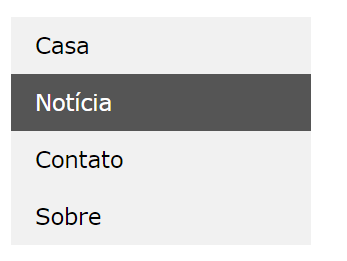
Agora um exemplo com estilos aplicados:
<!DOCTYPE html>
<html>
<head>
<style>
ul {
  list-style-type: none;
  margin: 0;
  padding: 0;
  width: 200px;
  background-color: #f1f1f1;
}

li a {
  display: block;
  color: #000;
  padding: 8px 16px;
  text-decoration: none;
}

/* Change the link color on hover */
li a:hover {
  background-color: #555;
  color: white;
}
</style>
</head>
<body>

<h2>Vertical Navigation Bar</h2>

<ul>
  <li><a href="#home">Home</a></li>
  <li><a href="#news">News</a></li>
  <li><a href="#contact">Contact</a></li>
  <li><a href="#about">About</a></li>
</ul>

</body>
</html>
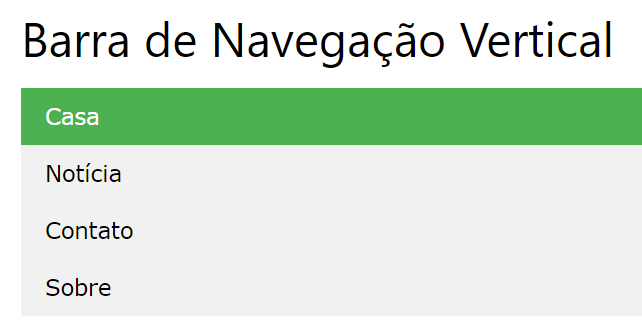
Com um menu ativo
<!DOCTYPE html>
<html>
<head>
<style>
ul {
  list-style-type: none;
  margin: 0;
  padding: 0;
  width: 200px;
  background-color: #f1f1f1;
}

li a {
  display: block;
  color: #000;
  padding: 8px 16px;
  text-decoration: none;
}

li a.active {
  background-color: #4CAF50;
  color: white;
}

li a:hover:not(.active) {
  background-color: #555;
  color: white;
}
</style>
</head>
<body>

<h2>Vertical Navigation Bar</h2>
<p>In this example, we create an "active" class with a green background color and a white text. The class is added to the "Home" link.</p>

<ul>
  <li><a class="active" href="#home">Home</a></li>
  <li><a href="#news">News</a></li>
  <li><a href="#contact">Contact</a></li>
  <li><a href="#about">About</a></li>
</ul>

</body>
</html>
Com borda
<!DOCTYPE html>
<html>
<head>
<style>
body {
  margin: 0;
}

ul {
  list-style-type: none;
  margin: 0;
  padding: 0;
  width: 25%;
  background-color: #f1f1f1;
  position: fixed;
  height: 100%;
  overflow: auto;
}

li a {
  display: block;
  color: #000;
  padding: 8px 16px;
  text-decoration: none;
}

li a.active {
  background-color: #4CAF50;
  color: white;
}

li a:hover:not(.active) {
  background-color: #555;
  color: white;
}
</style>
</head>
<body>

<ul>
  <li><a class="active" href="#home">Home</a></li>
  <li><a href="#news">News</a></li>
  <li><a href="#contact">Contact</a></li>
  <li><a href="#about">About</a></li>
</ul>

<div style="margin-left:25%;padding:1px 16px;height:1000px;">
  <h2>Fixed Full-height Side Nav</h2>
  <h3>Try to scroll this area, and see how the sidenav sticks to the page</h3>
  <p>Notice that this div element has a left margin of 25%. This is because the side navigation is set to 25% width. If you remove the margin, the sidenav will overlay/sit on top of this div.</p>
  <p>Also notice that we have set overflow:auto to sidenav. This will add a scrollbar when the sidenav is too long (for example if it has over 50 links inside of it).</p>
  <p>Some text..</p>
  <p>Some text..</p>
  <p>Some text..</p>
  <p>Some text..</p>
  <p>Some text..</p>
  <p>Some text..</p>
  <p>Some text..</p>
</div>

</body>
</html>
Agora um layout pronto
<!DOCTYPE html>
<html>
<head>
<style>
ul {
  list-style-type: none;
  margin: 0;
  padding: 0;
  width: 200px;
  background-color: #f1f1f1;
  border: 1px solid #555;
}

li a {
  display: block;
  color: #000;
  padding: 8px 16px;
  text-decoration: none;
}

li {
  text-align: center;
  border-bottom: 1px solid #555;
}

li:last-child {
  border-bottom: none;
}

li a.active {
  background-color: #4CAF50;
  color: white;
}

li a:hover:not(.active) {
  background-color: #555;
  color: white;
}
</style>
</head>
<body>

<h2>Vertical Navigation Bar</h2>
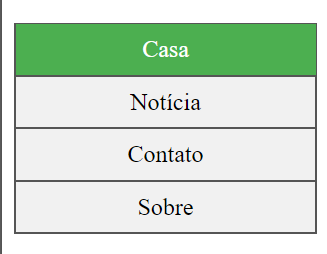
<p>In this example, we center the navigation links and add a border to the navigation bar.</p>

<ul>
  <li><a class="active" href="#home">Home</a></li>
  <li><a href="#news">News</a></li>
  <li><a href="#contact">Contact</a></li>
  <li><a href="#about">About</a></li>
</ul>

</body>
</html>
<< Anterior Barra de Navegação CSS


Deixe um comentário