A opacitypropriedade especifica a opacidade / transparência de um elemento.
Imagem transparente
A opacitypropriedade pode assumir um valor de 0,0 – 1,0. Quanto menor o valor, mais transparente:
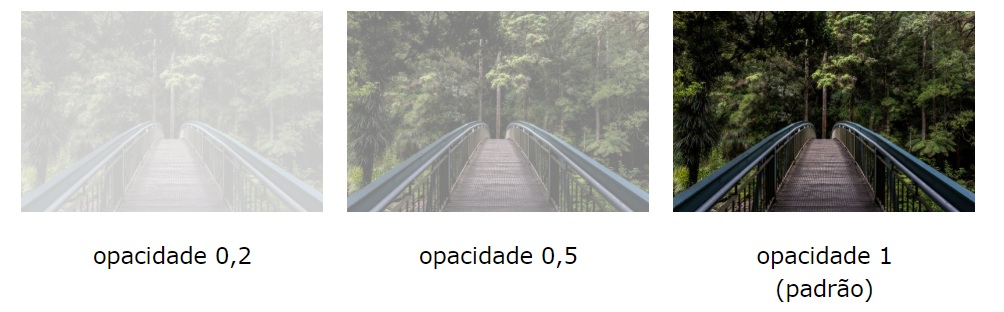
<!DOCTYPE html>
<html>
<head>
<style>
img {
  opacity: 0.5;
}
</style>
</head>
<body>

<h1>Image Transparency</h1>
<p>The opacity property specifies the transparency of an element. The lower the value, the more transparent:</p>

<p>Image with 50% opacity:</p>
<img src="https://www.joemaster.com.br/tutoriais/wp-content/uploads/2020/06/estrutura-basica-de-um-documento-css-1-300x169.jpg" alt="Forest" width="170" height="100">

</body>
</html>
Efeito de passar o mouse transparente
A opacitypropriedade é frequentemente usada junto com o :hover seletor para alterar a opacidade ao passar o mouse:
<!DOCTYPE html>
<html>
<head>
<style>
img {
  opacity: 0.5;
}

img:hover {
  opacity: 1.0;
}
</style>
</head>
<body>

<h1>Image Transparency</h1>
<p>The opacity property is often used together with the :hover selector to change the opacity on mouse-over:</p>
<img src="https://www.joemaster.com.br/tutoriais/wp-content/uploads/2020/06/estrutura-basica-de-um-documento-css-1-300x169.jpg" alt="Forest" width="170" height="100">

</body>
</html>
Caixa transparente
Ao usar a opacitypropriedade para adicionar transparência ao plano de fundo de um elemento, todos os seus elementos filhos herdam a mesma transparência. Isso pode dificultar a leitura do texto dentro de um elemento totalmente transparente:
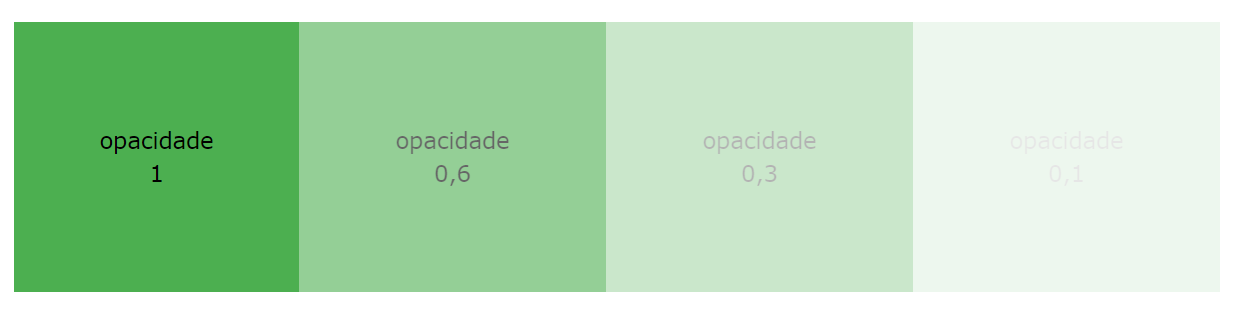
<!DOCTYPE html>
<html>
<head>
<style>
div {
  background-color: #4CAF50;
  padding: 10px;
}

div.first {
  opacity: 0.1;
}

div.second {
  opacity: 0.3;
}

div.third {
  opacity: 0.6;
}
</style>
</head>
<body>

<h1>Transparent Box</h1>
<p>When using the opacity property to add transparency to the background of an element, all of its child elements become transparent as well. This can make the text inside a fully transparent element hard to read:</p>

<div class="first"><p>opacity 0.1</p></div>
<div class="second"><p>opacity 0.3</p></div>
<div class="third"><p>opacity 0.6</p></div>
<div><p>opacity 1 (default)</p></div>

</body>
</html>

<!DOCTYPE html>
<html>
<head>
<style>
div.background {
  background: url(https://www.joemaster.com.br/tutoriais/wp-content/uploads/2020/06/estrutura-basica-de-um-documento-css-1-300x169.jpg) repeat;
  border: 2px solid black;
}

div.transbox {
  margin: 30px;
  background-color: #ffffff;
  border: 1px solid black;
  opacity: 0.6;
}

div.transbox p {
  margin: 5%;
  font-weight: bold;
  color: #000000;
}
</style>
</head>
<body>

<div class="background">
  <div class="transbox">
    <p>This is some text that is placed in the transparent box.</p>
  </div>
</div>

</body>
</html>
<< Anterior Pseudo elementos CSS


Deixe um comentário